Showing posts with label webtools. Show all posts

Wednesday, 6 February 2013

Obfuscation


Clearly I am reaching the limits of either Serif WebPlus' or my old pc's capabilities but that's not why I'm posting this screenshot. I have written before about Greenshot and if I were to ever find a piece of software that tells me which programs I use most often other than operating system things then Greenshot would be up there in the Top 10.

Firstly, getting this as an image was simplicity in itself. You just hit the Print Screen button and up comes a grid that you drag around an area of the screen to save. I wasn't terribly accurate with this one and, yes, I could have used alt+Print Screen and then pasted it into an image editor in this particular case but most times I just want a part of a window. Normally that's it, I would just save the image and use it wherever it's intended to go.

This time, however, I thought I'd better do something about an ftp address and, instead of saving, Greenshot has several other options on offer, including its own little editor. I chose that and immediately there's a toolbar with various things I may or may not want to do to the image. The coolest is called Obfuscate and it pixelates whatever area you specify. Love that.

You'll almost want to take screen prints with this tool just so you can obfuscate!


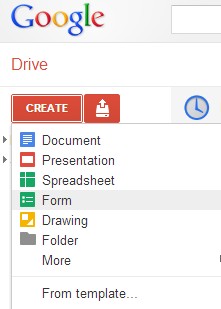
Webtools; notes on Google Forms now available

For some reason I missed out notes I'd written on how to set up a survey using Google's brilliant Forms.

So that's there now - here's the direct link.


Thursday, 18 October 2012

Apps²

A colleague has just shared this infographic that she found. My first thought was OK, that's interesting, a bit out of date but nice to see someone promoting use of some of these tools which, of course, is what I spend an inordinate amount of my time doing.

Click to enlarge

Then I had second and third and fourth thoughts. 

2. It's really a bit of a mess. 
I'll simply have to do something about that and redo it in rather smarter fashion, maybe adding some much needed links too. 

3. There are some quite important tools missing. 
OK, it may be old so I can remove some and add some. 

4. There are quite a few instances where lines need to go in more than one direction, tools that can be good for several elements. 
That can be included in the reworked version.

It was the fifth thought that really stuck, though: 
5. Wouldn't it be great if we could start in one application and stay in that application with everything we might need being something like an app within that application. 
Sort of app².

Ideas, drafts etc. go in and out of this central application. Some you discard. Some go straight in. Some need a bit of editing first and then get embedded. The whole end product, or 'content' as this graphic calls it, is a combination of various elements: text, images, data, media and any other dimension that I've missed out that can be shared, linked to, embedded, displayed or even printed in part.

I don't quite know where I'm going with this but thanks to Shri for getting me off on yet another journey in this e-learning world!


Tuesday, 9 October 2012

Caibre - Make, Find and Manage Ebooks


Very impressed with Calibre, an open source application for managing e-books. It converts files to make documents compatible with all kinds of device and just seems to be able to do everything you might ever want.

Being able to browse books by cover is great and so too is the News search and download with a huge range of sources across the world.

Whether you just want to organise all those e-books you've accumulated, find more or browse news in the world on your device, this software is well worth downloading. You will surely find it useful at one point or another and can use it to create your own - that creates some interesting opportunities for sharing material perhaps?

The developer, Kovid Goyal, has also put together a first class video showing you how it all works.

http://calibre-ebook.com/demo


Wednesday, 3 October 2012

Something I forgot in the Webtools Media section: VLC Media Player


A colleague just asked what application would be good for converting certain types of video files (without using an on-line tool) and my first thought was to have a look at the web tools site to check out VLC.

For some reason I had forgotten to include this excellent bit of software from the VideoLan organisation when I transferred links from the previous site! So I've added this back in now and am here giving it a bit of extra promotion because it is very simple and very good. Admittedly, you don't get all the bells and whistles and lovely graphics of Windows Media Player but it does what it says on the bollard, I mean, tin.

Whilst it's not really a 'web tool' it is a tool and you do get it from the web and you may well find it pretty damn useful so it should be included in the Media section which is where I shall now add it.


Tuesday, 2 October 2012

More experiments with web tools: Animoto


Make your own photo slideshow at Animoto.

The interface makes it dead easy to grab a folder of images from Picasa (or other on-line collections). Limited selection of music tracks in the free version but this one kinda worked. My son'll like it anyway and will probably have tagged himself in it already.

One idea I must try is to make images that fit a particular learning object - maybe illustrate a process in a fun way. The key thing about this, though, is that this took longer to process than to make. It can only have been 2 or 3 minutes to log in, select an album, a template and a track. Animoto do the rest.

Just checking out some tools: GoAnimate


The toolbox 1 by AndrewHill on GoAnimate

Video Maker - Powered by GoAnimate.

Think I need something with better expressions! And they sound pretty boring too! Still, it's so quick and easy that it shouldn't take too long to make another. First I shall look at some alternatives, though. 

Wednesday, 26 September 2012

Friday, 14 September 2012

Web tools update

New additions on the Web tools site:

penzu a delightful and delightfully simple to use note, blog, write it down tool with lots of extra uses

101 a simple app which makes sending SMS to pupils and parents easy and safe

lingro very cool on-line dictionary, 11 languages and facilities for web translation

QR codes make your QR code images and links

meetings.io video conference as simple as it can be - just share a url!

myna remix music tracks, collaborate, record your own voice

Schoology a nice place to view and share teaching resources with extra features too for your own classes

BrainNook
SccotPad
ConceptBank

three apps featured on the Schoology site but which have appeal individually for maths and language, common core subject activities

yola nice all-on-line web site building with no code knowledge required and almost invisible advertising


Ooo, Schoology!

Some time ago I signed in to Schoology, thought it looked interesting but then must have been distracted by something and forgot to go back and review the site. It's great - well set out and, so far, seems free and uncluttered with no adverts trying to sell us this or that.

I am still trying to figure out exactly what I can do with an area called The Studyzone which I presume is the name I gave to one particular area but the key feature that I should draw your attention to is the shared resources section. Here teachers from all over the place have added their own materials and links. These can be searched and sorted - by most highly rated or most recently added, for example (although none of those I added appeared in the most recently added search so my guess is that there must be some delay between publishing and their actual availability for reasons I have yet to understand. With luck, it will be a check on suitability, copyright and if someone is filtering out potentially offensive material then that would be a good reason.

Yes, it's mostly US-based and the references are to their curriculum but whether you say maths or math, organise or organize shouldn't detract too much from their value. I suppose the English materials could get a bit annoying with dialing instead of dialling (although just who does dial any more?) but, again, it may well be that the basic ideas being shared could be easily adapted for use on whichever side of The Pond you are.

I like the link to Google Documents which would enable very quick sharing or publication of files stored on-line but haven't yet put that to the test.

There's a blog section but, really, you might best be advised just to throw in a single post linking to your existing blogs and continue to utilise Blogger, Wordpress, Tumblr or whatever which have rather more useful RSS feeds that can be picked up and deposited elsewhere, like VLEs if you still use one. The still was deliberate as, and this will have to be a separate article, I think we are coming to the end of VLE Days as we know them. But that is another story. Back to Schoology.

In amongst a section called Apps I found a few new bits and piecesI had not encountered before that look worth a closer look and will be added to the Webtools site soon. these are 101, a simple way to text students, parents etc with updates, advice, requirements etc. Another is BrainNook. In BrainNook, children travel through virtual worlds while playing math and language games, complete assignments to win badges, and compete with their classmates to reach the top of their class scoreboard. BrainNook games are mapped to the Common Core State Standards for Mathematics and Language Arts.

Then there's Scootpad. ScootPad is a way to engage students in mastering Common Core Standards and Concepts in maths and reading with personalised, self-paced and stimulating practice. It is claimed that their data and research show that students practice on average 5 times more problems on ScootPad than the traditional worksheets/paper.

Teachers get real-time classroom performance dashboards and reports that enable in-depth progress tracking and proficiency insights. Teachers can assign and review homework (Maths Practice, Reading Practice, Spelling Practice, Reading Log etc.) and students can complete and manage their homework all online on ScootPad.

Lastly, there's Concept Bank. Now that's not a name that is likely to fire the imagination but this is what they say it does: "Common Core Standards drive a major shift in both instruction and assessment. We've made it easy for educators to access/navigate the standards, drill down to the supporting concepts and review sample questions to better understand the instructional shifts and practice rigor needed to ensure that all students are on track to college and career readiness." It looks a lot simpler and that's why I'm including it here. They might need to hire someone to write better reviews or descriptions.

Now it may be that I've missed some huge charge for some of these apps or that they are totally impossible for anyone in the UK to utilise but maybe someone will take a closer look before I get a chance and advise. Certainly if you're reading this in the States then these could be useful straight out of the box. Wherever you're based, though, I would encourage you to take a look at Schoology.

Tuesday, 17 July 2012

Thinglink - make your images interactive

Love this new free tool from Thinglink. It makes it easy to add hotspots to your images which display as small dots which, when moused over, display video, text or almost anything by way of web content.


Always a big fan of using images in materials and resources for students and just making whatever you create look more interesting, this adds yet another dimension to them.

Friday, 6 July 2012

E-fair 2012 Review: 'Could Do Better.'

The 12th E-learning Fair organised by JISC RSC Eastern took place in Watford, Hertfordshire yesterday. As with all these events, a shiny new Further Education College building was the venue - in this instance the recently opened West Herts College. Practitioners and interested individuals came from all over the Eastern Region and beyond and there were also representatives of a number of organisations showing off their wares and services for the teaching and learning community.

The communication from the College had those dire warnings about parking 'being very limited' at the campus, with what are becoming increasingly frequent admonishments from educational institutions and agencies about driving cars anywhere. Fortunately, I arrived to find a huge car park with bags of space so I don't quite understand what all that was about. Much as though their offer to support me with a cycle loan was appreciated, the journey from Northamptonshire to Watford was slightly beyond what I reckoned my legs could manage. Having said that, the number of traffic jams I encountered during my unfortunately-timed trips may not have resulted in the car being that much faster!

It was a pleasant enough building and not as ugly as some of the new ones and certainly an improvement on what was crumbling on the site before. A strangely inconspicuous entrance made you feel that the place was, at least, not one of those extrovert buildings that shout at you, almost appearing to watch you as you approach vast glazed entrance portals that somehow manage not to show your own reflection. Once inside there is this massive reception area where the lovely RSC Eastern staff looked like little Lego models in the immense space. There were also rows of those ticket machine things like you have to pass through to get in or out of a tube station. That would fool a great many students at some colleges I know and would definitely cause an enormous rise in greenhouse gases as they bus or taxi home again to get their ID cards. Presumably Watford students have better memories or have them glued on to their bodies somehow.

Normally at events like this you're handed a card bearing your name and who you represent housed in plastic of varying degrees of quality which then has to be appended somehow to your clothes or, more popular these days, a brightly coloured bit of material allows you to dangle said ID around your neck. Here we had the bright lanyard but to that was attached a mini booklet with one's details on the first page and inside the agenda for the day. It would no doubt have sounded a great idea at the planning meeting but I have a feeling that absolutely no-one actually ever consulted said booklet which tended to open upside down and there was always someone around to ask what was happening and where anyway.

In fact, my urgent need after a 2½ journey was a loo and I didn't just get waved in a vague direction but a delightful young student took me to the appropriate door and even asked whether I'd be able to find my own way back again. That was something that did impress me throughout the day - the students (well, I am presuming they were students) were extraordinarily polite, smart-looking and helpful. Later in the day I was asked to go and get myself filmed giving views on the day and, again, it was a team from the College that ran that. Three really nice young people, professional and, whilst I have yet to find out how good their filming and editorial skills are, they did serve their College well. I have always found similar behaviour at my children's school when parents are dragged in for some talk or another but seldom have Further Education college students come across that well.

The purpose of these events has always been to inspire people to use new technology, new techniques in their teaching or in supporting learning. We get people from other colleges to show what they're doing, to talk about what they find works and some agencies or commercial organisations have stands promoting their services or wares. Once there might have been a string of these government agencies and quangos but now there's just LSIS. One commercial firm, whose name escaped me (which says something about their marketing prowess) was getting lots of attention by dropping iPads from a great height. Wrapped in some ghastly-looking rubber blob, the devices seemed to survive. Well, they would. But would I really want to go around with some huge, rather ugly-looking black rubbery blobby tyre wrapped around the thing? Hardly. It reminded me of the great big bumpers they sued to put on Volvos for a period in the 1970s. I am sure that, assuming Apple doesn't require future buyers to sign a form declaring that they'll never put one of these things on their products in public and kill the market immediately, this will be one of those products we giggle about in a few years' time. The same firm also had sheets of that unbendable but light plastic stuff with slits in that somehow would enable you to create an individual or group workspace or something. Yes. I moved on.

To get a coffee you queued at a table, spooned some instant granules into a cup and then had the challenge of working out how to extract water from one of several silver tube-like affairs with black plastic lids and a sort of spout. These things may look nice but there is never, ever, a clue as to what you're supposed to do. Or what may come out if you do manage to figure out the process. Luckily I was accompanied by someone familiar with the things and eventually managed to press the black part in the right way to get hot water.

Probably the best part of these events is the chance to chat with colleagues and find out what they're doing, meet new people with the same problems as you in making something work and perhaps hope that one of two of the people you meet might give you a chance to do some work for them or give a talk at a staff development session or even another conference.

Whilst I do get nervous prior to giving talks, it is something I always enjoy and get lots of appreciation for afterwards and I'd love to do more of that sort of thing. Our guest speaker this year was Lilian Soon, an intelligent and lively young lady who is particularly good at knowing what to do with mobile devices and getting people to share views using one or another set of web tools. I share a lot of her views and was delighted when she came out with a Google Presentation instead of PowerPoint and referred to VLEs with some disdain. Now that's something I haven't heard anyone else saying. She was a bit uncomplimentary about xtranormal, a nice site where you can make mini cartoon animations which I quite like and I never did find out why but, that minor point aside, she talked a great amount of sense. That is highly unusual for guest speakers at other events but we do seem to get good people at our e-Fairs.

A few minutes in, though, and despite her laudable intent, I did find myself itching to get up and take over. We were sitting in some theatre environment, shades of very dark grey everywhere, remnants of tape on the floor and with odd lights here and there shining directly at three or four of us in the audience and on the floor around her. She was standing on a tatty stage, quite a small area and you could sense that she wanted to wander around but couldn't easily. One leg kept flicking up in an endearing way as if she were about to start running somewhere but didn't. What she said was good but what she demonstrated didn't really work. There was a video of how Google Presentation could be used to create a supposedly stunning animation. I have seen something similar (and a lot better, actually) and this one was not very good. It really needed the background track which I believe contained music and some explanation of what the hell was going on. As it was, you could sense the audience wondering how they were supposed to make a presentation with the stated 450 slides, not to mention why. If anything, that would have put someone off Google Presentations for life.

Lilian then tried to get people to respond to a question by texting their responses which would then appear on the screen behind her. I suppose if she had gone off for a while we might have done something but fiddling around in that light with phones that may or may not have had a connection there wasn't a particularly popular activity and most of us were too busy listening to her anyway. There was also a most distracting animated swirly affair on another screen which repeatedly showed tweets to the e-Fair's hashtag. With a total about about six different messages that got quite annoying. Maybe if the software didn't whirl them around so much it would have been better. We've had these displays before and they been fine but not that one. So only three or four responses appeared and you got the sense that she was struggling a bit. It's all very well showing off these things but they do need to work and the audience needs to be given some ideas as to how they could actually be useful (and work) in a classroom, assuming classrooms are where students will be, of course, in future.

That topic she did touch on and I was pleased to see reference to a range of good on-line courses and materials like The Khan Academy and some American universities. In a similar talk I gave a while ago, though, I had illustrated what they did and what the interface looked like, as well as getting quite a wow moment when people saw the extraordinary list of topics that could be addressed. Lilian really missed those sort of opportunities, running along to the next item without actually making that much of an impression at the time. She was also really having difficulty with connections that simply didn't work with the dreaded NOT RESPONDING message appearing rather more often that any presenter wants to happen. This all serves to worry people who are there to see what they might perhaps try with technology. In a way, you can get away with these glitches and troubles with a highly technically aware audience but not with people who are nervous about what they can do. If she can't work it then what chance do I have? was a theme running around the section of the theatre I was in and I suspect it was wider too.

So, whilst our guest speaker certainly had all the right ideas and such good intent, and did make several great points along the way, it was nothing like as good as she could have been. Luckily, all her items are available on-line and many will go and see some of them as they should have appeared so all need not be lost.

Most of the day would have been spent by people going around the Show And Tell area where nice people from places from Norwich to Bedford, stopping off at Chelmsford and Cambridge on the way, had pcs displaying whatever they'd been working on at their own institutions. Bedford had a student progress tool that could be plugged in to moodle. It looked remarkably similar to the Google Spreadsheet I have been using for years. It was pretty and I am sure there is something about it that would make all the effort put into its development worthwhile but, in terms of simply showing students or managers the progress through units there wasn't much I could see. I guess the automation of its updating when students upload assignments would be a plus but how difficult is it to add a tick to a spreadsheet box? I also wonder how many of my old colleagues would have wanted their students' progress shown as nil (because they hadn't actually handed stuff in) when they were, in fact, doing well, working on them - which was why my sheet had that element of 'seen to be working well' or something like that in a different shade so that anyone observing my or their progress needn't panic. If the sheet picks up all the criteria from some database of BTEC modules, though, now that could be useful - but will they share it? Now there's the rub. For a price, no doubt, knowing Roy Currie!

Lilian had mentioned one excellent point that I've just remembered: here we all are looking at wonderful bits of software and doing this or that with it but what does it actually achieve? Sometimes all it does is show things differently but doesn't really help them learn any better. It can take longer to put something on a VLE than to put it on a blog or your own web site. Do students really appreciate VLEs any more? There are other ways to do things. In fact, I gave that speech way, way back in 2005 at exactly the same College!

One of the best bits of technology on display was from Norwich, where Phil Ackroyd had a dozen mice which people could use at the same time and have their individual marks or whatever displayed on one screen. He told us about Microsoft's free add-in called Multiple Mouse. I hadn't heard of that before and, whilst it did look a bit chaotic at times, I can well imagine how teachers could use this in a class with wireless mice and something like a voting form or marking areas on a drawing. Very simple and that went down really well.

JISC TechDis were on display as well with their well-researched and respected assistive technology. So too was an Apple TV something or other that I'm afraid I didn't get a chance to investigate as thoroughly as I should. Someone was also doing wonderful things with QR codes but the last upgrade on my phone had wiped out a whole pile of apps and QR Reader was one of them. That was several months ago which rather brings it home as to how useful these blurry squares really are in day-to-day life. Yes, I can see the value of a quick way to give people links to material but until some reader is embedded in devices rather than having to be installed and activated it's not for me. Just give me a simple web address. The guy with the codes I remember seeing at another E-learning Forum event some time ago. There he had shown us Google Goggles too and created a brilliant show based on that and QR codes. Today he was at a small desk covered, literally covered, in gadgets but none of them were the sort of thing you wanted to pick up and play with. They may well have been wonderful things and he is definitely someone who knows what he's talking about but maybe needs a little better promotion and organisation next time.

Rod Paley from Xtensis had some cool web templates under construction which looked like an interesting mix of social network and resource sharing for educators. I could see that the structure his colleagues had developed could be a winner in all sorts of fields so that should be worth following. These guys often come up with attractive designs and clever animations and present piles of data well but never quite hit the big time. I may well be working with them for some project I have on the go at the moment. More about that somewhere else. Whoever does the designs had a marble theme this time which was fun and the one and only freebie this year was a bag of XtLearn.net marbles. I managed to get the very last one going. That'll please the kids. Now there's promotion that works - that is, I think, the first link I've put in this article. (I may well go back and ad a few more later.)

Finally, it's the end and Gerard Harper, the RSC Eastern team manager, does his thanks for coming bit and we all clap quite a lot. He wasn't on his best form this year, possibly the harsh-looking cuts to his budget next year were on his mind and leaving him a little lacklustre this time. He's an amiable and well-informed and well-connected chap and, with his team, work very hard to put these events together and in running several varieties of forum throughout the year. These events were once led by the Eastern Region E-learning Forum itself, Gerard's being the agency that supported them and helped make them happen. LSDA, Becta, NLN, Ferl and goodness knows who else would have their logos on the programmes (which I used to design too!) but only LSDA ever put any money into the kitty and even that wasn't much. I did like the fact that the Forum was independent, though, and I have to pay due respect for Gerard's outfit not totally taking them over and allowing anyone, within reason, who wants to show or have a stand use the opportunity. The events are all RSC branded now and they do everything. I just turn up nowadays and didn't even get to pick the prize-winners this time. I was thinking of resigning as Chairman of this E-learning Forum, thinking that there might not be that much more we could do and having little influence on anything at meetings but, after seeing just how little most practitioners and institutions have moved over the years, I can see there is a massive amount still that can be done, needs to be done and, perhaps, it is time to shout a little louder.

Despite all their best efforts, none of the agencies has really had the impact I would have expected after all these years at the classroom interface. Smartboards, VLEs, on-line materials and all the peripheral uses for devices would have happened anyway. On-line courses and the exciting possibilities offered by 'flipping the classroom' or variations of these themes are happening anyway. Universities are slowly waking up and doing things their own way, especially in the States and with Google and other major players. We seem to have lost that connection with the Giants. We need them, whether people, consortia or big companies. The Forum most definitely has a purpose to its existence and the chance to discuss with colleagues what is happening and to share all the super knowledge that exists in out community remains and I want to see that flourish and draw in more people from sectors we haven't yet reached. The Fair, as an annual event we look forward to, should continue and I'm happy for JISC RSC to take care of the organisation of it all but I want the Giants there not just mentioned in passing.

I do blame myself to some extent. I haven't been active enough. Since the last reorganisation at my college I have been tied to a timetable and simply unable to get to meetings or sessions for several years and have had to turn down invitations of give excuses. I even managed get the date wrong last year and miss the Fair completely! I'm free of all that now. So it's time to get my act together, get the Forum back on the road as it once was, get inspirational colleagues back on board and starting doing what we should be doing - demonstrating excellent practice ourselves which, regrettably, didn't really happen this year as well as it might. Few will have noticed, and I am confident that JISC RSC will, once again, get glowing reports on their feedback sheets but I should have added a line to mine: "They worked hard but could do better."


Tuesday, 5 June 2012

Dunstable Departure


I finally have a date when I shall be free from the chains of Further Education college employment. From 30 June 2012 the daily trudge through traffic on the A5 south of Milton Keynes ends and I need no longer fear retribution for not including references to Equality Act strands in my lesson plans.

I shall continue with my role at Middlesex University but to have so much flexibility as to when I can meet current clients and potential new ones will be marvellous. In many ways, I wish I had retired from what was then Dunstable College several years ago as everything worthwhile that I have achieved recently has been completed in my own time - late evenings, weekends and stolen days here and there. Once, I felt that I could make a difference at College, when, as their ILT/E-learning Co-ordinator and seconded to the Learning & Skills Development Agency and its successors for a proportion of that time too, my days were spent helping staff not just at Dunstable but across the country. Those were great days and, especially through LSDA's Q Projects, where I was in a position to fund small projects for using technology in teaching, and with chances to speak to audiences at various agency gatherings, personally rewarding.

With a bit of luck I shall be able to pick up some of that type of work again although, with most funding sources drying up now, I guess it will have to be from persuading budget holders that spending a few hundred on yours truly will be beneficial.

There are many ideas that I'd like to launch but I know I can't do them all! Here's a flavour of where I may concentrate my initial efforts.

Staff ICT Skills Audit


Already being trialled by institutions here as well as in the States, I shall be working with colleagues to promote this simple way to discover who your ICT stars are and who needs a bit of extra help in this vital field.

On-line Surveys


Combining my skills in design and data analysis, I look forward to offering a complete service to those wanting to ask questions and get results - all on-line.

Web Tools


Staff development sessions on new and free tools and applications that can make a difference in course management and the learning experience.

Web Design


Sites that look good and do what people want them to do. Simply.

Images


With huge picture files still causing trouble all over the place - from e-mail attachments and use on-line to those that are in desperate need of a bit of editing - some staff development sessions to explain everything ought to be fun and worthwhile for a wide range of people, and not just in education either, I suppose.

VLEs


What's wrong with today's virtual learning environments (or MLEs as they may be termed in the States) is worthy of a separate article so I'll be brief here! Here, the UK Government gave institutions a pot of money years ago and they all rushed out and got WebCT, Blackboard, moodle or something similar. So what's happened since? Not a lot. Yes, most courses now have some material and links to resources on-line. Yes, management can now tick some boxes about using technology, show statistics about student usage. But, with a few exceptions, most provision of this sort has become stale, clunky and I have even heard students moaning about moodle, preferring tutors' individual sites and portals to materials. That global solution that the corporate VLE brought has limited value now as a student-programme interface. It's time for a change and I will simply love moving forward the thinking of anyone prepared to listen.

On-line courses

This could well be The Big Thing this decade. It's early days now and, for many institutions, the thought that they may not actually have students wandering around their wonderfully glamorous, glassy and smart premises that have cost taxpayers billions in a few years' time isn't one that does much for a Principal's ego, never mind career. I warn them all now, though: change is coming. Given the choice, at least a third of your students on full-time National Diploma-style programmes would prefer now to study at home in their own time and just attend a centre for tutorials, guidance and specific topic days on a few days a term. Once the others start to see the quality and range of qualifications that can be delivered on-line instead of in class then that proportion can only rise. They're only still enrolling because no-one has told them that there might be an alternative. That's because there isn't yet but I shall be doing my best to design and create one, or, more probably, promote what someone is bound to have ready first!

I may think of some other things to do but these ought to keep me occupied quite happily for a while after 1 July. I would, of course, also be delighted to hear from anyone who can make use of my time and skills!


Monday, 24 October 2011

Thursday, 16 September 2010

Facebook for teaching and learning?

This is a reply I gave to a question on the excellent JISC Curriculum Champions list today which I thought may be of wider interest.

I've been experimenting with Facebook pages (as well as lots more!) over the years. In one institution that I'm associated with these have only been accessible on phones or via proxy browsers in class so of little use there but, after almost zero activity of value for two years, I have found a remarkable increase in the last few months by students and colleagues from home and discussions, sharing of thoughts, constructive comments and links to pretty relevant resources surprisingly (to me!) unlittered with rubbish or 'I'm just getting Luke to make me a sandwich' stuff which they now seem to reserve for their own personal pages.

I won't pretend that anything marvellous is happening but it's a familiar, dead easy to use environment and the new input each week has been something I have been able to refer to and expand on, or encourage more research into, in normal sessions. In particular, I've seen students helping each other with tasks and saying what they think about topics which doesn't seem to be happening much on the VLE.

In another institution access is not initially restricted and although one or two tutors have set up course or module pages none seem to have had much impact. It really does still seem to be something mostly used out of the classroom. This place has installed a control mechanism that enables tutors to monitor students' screens from a staff pc and as purely social use gets their access pretty smartly cut there have been quite a few mistakes as it was difficult to distinguish a personal page from an 'approved' one! I guess the topic (project management) hasn't lent itself to as much interest in research and sharing there as the other (web design) where there are links and visual interest a-plenty.

What does appear to be working well are pages set up in some Work Based Learning sectors I've been involved with. All the participants are adults and spread out across the planet, occasionally meeting for practical workshops. The simplicity of creating photo albums, for example, has enabled people who I know have pretty low ICT 'Office-type' skills to share examples of what they've done at these workshops. Discussions do have regular and generally organised input and a little direction from tutors which helps a lot. The main purpose of the pages was initially just to promote an organisation's events and activities and the inclusion now of nice comments, images and links to resources has had the pleasant effect of enhancing its image and their workshops.

There's nothing being done here that couldn't be done using other applications but Facebook just kinda works for many. I certainly wouldn't describe any of this as particularly significant, however, as there are lots of new tools around and coming up which enable more efficient and manageable delivery of course materials and interaction which will, I feel, be ultimately be preferred to facebook (unless fb develops its own app further in that direction!). In particular the advent of sites people can contribute to (and tutors edit) simply and the marvellous RSS feeds from tutors, students and authoritative source blogs will make a big difference to life in the classroom. Twitter is also proving to be an excellent tool for finding and sharing really up-to-the-minute ideas and resources and, indeed, many of the most valuable posts of those facebook pages were, in fact, auto feeds from Twitterfeed or similar!

Lastly, here's a video I found of a recent discussion in the States that you may get colleagues talking too. Some odd spelling in the comments - not mine, I should add!

Saturday, 31 July 2010

BLT! I like that. (The new webtools site).

Once upon a time there was ILT. Then it became e-learning or elearning and now it's . . . well . . . both and yet neither one nor the other. I've always liked information learning technology. It says it all - technology, learning, information. I suppose it could be argued that NLN got it right with their Learning Technology team, of which I was a member for a while. E-learning has always confused people and required us to spend the first 20 minutes defining it at the start of sessions and our colleagues from other parts of the planet think e-learning is distance learning or variations on the theme anyway. Which is fine too but all this hyphenated stuff is very 90s now. If you have to think up a term to describe something then your time's better used thinking up ways to use it. So I'm going back to ILT and good old web tools. Oh, hang on, they're apps now. Back to Square One.

Whatever it's called, we want tutors to use IT. Students expect it. They like accessing notes, tasks and anything they missed and want to look at again in their own home, with a friend or just somewhere other than the classroom at 9am. Or the library where they can't make any noise. Or the IT Workshop where they need the ID card they've forgotten and the computers probably don't have their familiar software, especially browsers, anyway.

All that's needed is to get a baseline of course materials on-line somewhere, make them look attractive, quick to load and simple to find. There are lots of great tools out there to make using learning technology easy for even the least enthusiastic tutor.

I've updated the webtools site and it's now all about what I'm going to call BLT. Brilliant learning technology. What you can do now is amazing and there's not a moodle upload or log-in in sight! The concept's unchanged: office-type, planning, research, media and web design applications listed in categories. All are free and almost all ad free. You are encouraged to review them, make comments and these you can now do using forms on most pages. I've dropped the PBworks wiki pages for this as it was quite hard work adding new pages both there and on the site plus links between them for every new entry. Instead, I'm using Google forms which will publish responses through the site. Good examples people have supplied of apps in action I shall retain and make links to them on the appropriate pages. The wiki will stay but I'll redevelop it as it is one of my favourite BLTs in its own right.

So, go and get your images sorted out and resized, find or even make a video, add them to some cool web pages showing students how to be really smart in their research so they can complete your course for which, of course, you have put everything on-line somewhere, haven't you. Ah, forgot . . you'll need to plan all that but, yes, there'll be a tool for that!

Enjoy the new site!

Monday, 19 July 2010

Google just keeps on getting better and better

And it's still free, that's like a bonus! The latest improvement that I'm itching to try is in options available when making Google Forms. Forms are already a brilliant way to add lots of interest to teaching and learning material and now it looks as though we'll be able to make different parts of a form display depending on the responses to a question.

I have been staring at a blank screen for a while over the last few days trying to figure out the best way to revise my ICT Staff Assessment tool and this may be an answer. More about that in a while I hope.

The webtools site is also undergoing a good shake-up. It's proving to be a longer process than I'd first thought but'll get there. Google now could appear on virtually every page but I still do want to get you playing (and hopefully reporting back too) on some of the lesser known and newer tools out there.

Tuesday, 3 November 2009

Catch a wave


Delighted to get a Google Wave account at the weekend. And 20 invitations which I have already had requests for at a ratio of about 5:1. If you haven't heard of this then you soon will (and there are links in some previous posts). Think e-mail, IM, live collaboration on a document, image or video sharing, maps showing where you or something mentioned is, polls all rolled into one application that lets you see someone's message or additions as they enter them rather than waiting for them to hit send and you may get the idea.

I'll be trying it out with some carefully chosen friends, probably doing something silly like planning a trip to Greece or boring like agreeing a meeting agenda at first and then hopefully extending it as we get more expert and figuring out what we can achieve.

If you think you could be a useful ally in this trial then contact me - there should be a link somewhere on the blog. Or look on my web site.

So, to end as I started, with a Beach Boys track, Let's go surfin' now, everybody's surfin' now, surfin' USA . . . and UK.

Thursday, 29 October 2009

"Surely he's not saying students should have Facebook in the classroom?"

That's what many people will probably say when they start reading this. Especially the IT Services people who control what everyone in the College can access, including teachers!

Having read through Online College's 100 Ways You Should Be Using Facebook In Your Classroom, though, I do hope some will think about this a bit more. I can't say that I agree with every one of the 100, and you may well think of some more, but this is a great list of ideas and some simple but effective ways to approach tasks in a different way.

I'd probably change the title to say 'Could' instead of 'Should' and you'll need to bear in mind that it's American so some tweaks here and there required as well as a few less 'z's.

I'll add the list to the web tools wiki for future reference, which you can also access via the Facebook link in the More Tools section on the main site.

Wednesday, 9 September 2009

Etherpad brings real-time collaboration to documents

While Google Wave developers are polishing their product for launch Etherpad have slipped in with one bit that will certainly cause quite a stir - the document screen where you and others can interact in real time. It's quite an odd experience at first, watching someone else move your text around and add theirs - but you'll get used to that soon enough and appreciate the benefits and advantages.


This is certainly worth experimenting with - public spaces are free but if you want to work privately with a title.etherpad.com address to store work the free version is limited to 3 colleagues. I'm a bit surprised at the $8 a month fee for more people at this early stage. Few people will have heard of this and are unlikely just to buy, however cool the instant participation is. And, of course, Wave's on its way, and that will be free and, I rather suspect, knock anything like this into the wilderness.