Wednesday, 6 February 2013

Obfuscation


Clearly I am reaching the limits of either Serif WebPlus' or my old pc's capabilities but that's not why I'm posting this screenshot. I have written before about Greenshot and if I were to ever find a piece of software that tells me which programs I use most often other than operating system things then Greenshot would be up there in the Top 10.

Firstly, getting this as an image was simplicity in itself. You just hit the Print Screen button and up comes a grid that you drag around an area of the screen to save. I wasn't terribly accurate with this one and, yes, I could have used alt+Print Screen and then pasted it into an image editor in this particular case but most times I just want a part of a window. Normally that's it, I would just save the image and use it wherever it's intended to go.

This time, however, I thought I'd better do something about an ftp address and, instead of saving, Greenshot has several other options on offer, including its own little editor. I chose that and immediately there's a toolbar with various things I may or may not want to do to the image. The coolest is called Obfuscate and it pixelates whatever area you specify. Love that.

You'll almost want to take screen prints with this tool just so you can obfuscate!


Webtools; notes on Google Forms now available

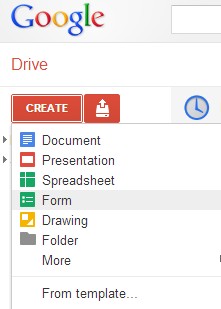
For some reason I missed out notes I'd written on how to set up a survey using Google's brilliant Forms.

So that's there now - here's the direct link.


Monday, 31 December 2012

New web tools site - lots of new links and notes

Web

I have just updated and completely revised the webtools site for teachers, students and, well, anyone really.

Lots of new additions and I have included some notes and suggested use decsriptions for a range of tools which will also be featured on the LSIS Excellence Gateway soon. (I have provided content - but not the design - for a Third Sector toolkit that will be hosted there).

If anyone has any more ideas just let me know. I'm sure I've missed plenty and, of course, new ones are appearing every week now which I'll try and keep up with.


Thursday, 18 October 2012

Apps²

A colleague has just shared this infographic that she found. My first thought was OK, that's interesting, a bit out of date but nice to see someone promoting use of some of these tools which, of course, is what I spend an inordinate amount of my time doing.

Click to enlarge

Then I had second and third and fourth thoughts. 

2. It's really a bit of a mess. 
I'll simply have to do something about that and redo it in rather smarter fashion, maybe adding some much needed links too. 

3. There are some quite important tools missing. 
OK, it may be old so I can remove some and add some. 

4. There are quite a few instances where lines need to go in more than one direction, tools that can be good for several elements. 
That can be included in the reworked version.

It was the fifth thought that really stuck, though: 
5. Wouldn't it be great if we could start in one application and stay in that application with everything we might need being something like an app within that application. 
Sort of app².

Ideas, drafts etc. go in and out of this central application. Some you discard. Some go straight in. Some need a bit of editing first and then get embedded. The whole end product, or 'content' as this graphic calls it, is a combination of various elements: text, images, data, media and any other dimension that I've missed out that can be shared, linked to, embedded, displayed or even printed in part.

I don't quite know where I'm going with this but thanks to Shri for getting me off on yet another journey in this e-learning world!


Tuesday, 16 October 2012

Too Many Apples For The Teacher


There is a scene near the end of The Prisoner in which Number 6 starts to speak. "I.." he begins. "I...I...I..." echo all the faceless ones in his audience. He tries to continue. "I..." only to be interrupted by yet louder and more forceful "I... I.... I..." and so it goes on... This seems quite appropriate to what seems to be happening now in many teaching advice articles, even to the extent of how to impress OFSTED (whose representatives surely would have made brilliant Number 2s had they been around at the time).

With all the free promotion from mostly intelligent and ostensibly fair-minded people like teachers and e-learning experts, Apple must be laughing all the way to the bank and can probably now afford to sack all but a few in their Marketing Department.

Everywhere I turn these days there's some eminent authority on education technology telling us, or a grant being offered by supposedly commercially independent quangos for institutions to report on, how wonderful iPads and iPhones can be and how to utilise Apple apps in teaching-and-learning.

I'm not saying that these are not good products. I'm not saying that they cannot contribute immensely to what we're all trying to do in education. What is so wrong is that these guys only talk about or write about or demonstrate Apple products.

There are alternatives. There are good alternatives. Some might argue that there are better alternatives. (I'll try and avoid that part of the argument!) But one thing's for sure - there are cheaper alternatives.

It's a bit like the days when colleagues would give presentations and tell everyone in the room to use PowerPoint or Word to do something that could just as easily be done in software that didn't need a Microsoft Office installation. I lost count of the number of references to Microsoft Office products I had to re-word in piles of course materials designed to assess teachers' and trainers' Information and Learning Technology skills in the earlier part of this Century proposed for publication by erudite bodies running on government money. Whilst they frowned on any logo or brand mark being featured in dissemination reports to the point where I was unable to get a payment authorised for something otherwise excellent with a picture of Homer Simpson somewhere in it, references to specific Microsoft or adobe products were conveniently ignored,

I have no objection to guidance notes and examples of how to do something featuring software or hardware that you need to pay for but when I read the more general recommendations or suggestions that teachers or institutions should adopt I really do think it is time for some balance.


There are loads of really good smartphones around now and soon there will be a real choice between Android and Windows 8 as well as the Apple operating system.


There are less numerous, but still excellent, Android and, coming soon, Windows 8, tablets or pads as well as the iPad. 

Generally Apple's products seem to be much more expensive than their Android competitors and the apps that I see recommended are often ones that have to be bought by staff or students on Apple systems where the Android alternatives are free. I have yet to read a set of suggestions where it would not have been easy to have written them with reference to the alternative products or by using generic terminology instead of specific tools which make the whole article deserving of a brown padded envelope floating through the writer's letterbox containing some suitable sign of appreciation from Apple. Something beginning with i, perhaps?

So can we please stop this ubiquitous use of Apple's very, very cleverly designed brand names. Let's talk about phones, not iPhones (or, worse, iphones!). Let's talk about pads or tablets or anything except iPads. Save those Apple Marketing people's jobs! They've worked hard to get you all on their side - it doesn't seem fair that you should be doing their work for them now does it?


Monday, 15 October 2012

Start with some quizzes or student comments with Socrative


Socrative is maybe not the best of names but it offers some useful tools to tutors to use in a class. At the beginning you can have some quizzes for them to do - multiple choice or asking them to include their own answer. If you know of someone else using the software and can get their Socrative quiz number then you can use theirs too, or instead, if you like.


On logging in the tutor is allocated a 'room' number. Students enter that on their devices and will then get to see the quiz or whatever that is provided there.

A nice feature is the way that the teacher can display the live results of the quizzes and also have them sent as a spreadsheet by e-mail.

It seems to work on a pc or mobile device quite happily with a clear interface actually best viewed on a mobile as the content tends to stretch across a normal screen and look a bit strange.

There are additional options for creating quizzes using a template that can be downloaded so the tutor can take their time setting up more detailed quizzes and answers in their own time rather than on-line. I haven't noticed yet how many times this can be used with, or what options are not available in, the free version but it's certainly worth a try to see what you can do with it, even just to have the students occupied at the start of a lesson while the late-comers wander in.

It hasn't the most intuitive of interfaces - for instance, it takes time to figure out how to make quizzes available and it expects students to include their name as Surname, First name which, together with the title, says something about the team behind this! I guess the way people enter names can be changed, though, and may just be a demo thing.

t.socrative.com and m.socrative.com are the mobile sites for tutors and students respectively. You can play around yourself with two devices and pretend to be a student or get the wife and kids to help check that it all works as you want.


Tuesday, 9 October 2012

Caibre - Make, Find and Manage Ebooks


Very impressed with Calibre, an open source application for managing e-books. It converts files to make documents compatible with all kinds of device and just seems to be able to do everything you might ever want.

Being able to browse books by cover is great and so too is the News search and download with a huge range of sources across the world.

Whether you just want to organise all those e-books you've accumulated, find more or browse news in the world on your device, this software is well worth downloading. You will surely find it useful at one point or another and can use it to create your own - that creates some interesting opportunities for sharing material perhaps?

The developer, Kovid Goyal, has also put together a first class video showing you how it all works.

http://calibre-ebook.com/demo